Showing posts with label Software. Show all posts
Convert Video to Audio (MP3) with VLC Media Player for Free
 VLC describes itself as a free and open source cross platform multimedia player and framework which plays most multimedia files and various streaming protocols. This article, however, involves utilizing the conversion abilities of the media framework rather than its media playing abilities to extract audio from any supported video.
Enable or Disable Hibernation in Windows

Hibernation is a special power saving state designed for laptops which do not have easy access to power supply for an extended amount of time. When you put your computer to sleep, your running programs stay in the memory (RAM) and your computer keeps drawing power to keep the RAM running. Hibernation on the other hand stores the content of your computer's memory on the hard disk in a hidden protected system file (C:/hiberfil.sys) which generally consumes disk space equal to 75% of your computer's RAM size.
How to Cut Videos with VLC Media Player

VLC offers the option of using the Record button (as covered earlier) to allow users to save a portion of the video clip that is currently being played. However, the problem with using the Record button for cutting videos is that you need to actually play the entire portion of the video that you need. This makes it especially difficult to cut lengthy portions of a video. Moreover, exact start and stop times are difficult to maintain. This article offers a better way to cut videos with VLC media player that solves both these problems.
How to Start Windows 10, 8(.1), 7 or XP in Safe Mode

Safe Mode is a special diagnostic mode in which Windows runs with the minimum amount of features. As the features are limited, Windows does not load unnecessary startup items and runs only those files and drivers that are necessary for the basic functioning of the operating system. Consequently, safe mode allows Windows to run despite having recently installed programs that might be preventing Windows from starting correctly. As Windows does not start unnecessary programs while in Safe Mode, it can also be used to remove viruses and malware with reduced risk of the infection getting worse.
How to Speed Up a Slow Windows Computer

Having a slow computer is not something most users fancy, but that is what most of us end up with after prolonged usage. Understandably, there are also a few of us who are stuck with a low-end PC and are forced to get as much out of it as possible. This article caters to both these type of users as it not only explains how to make your computer as fast as possible but also how to reduce the footprint of your system to utilize your PC's current system resources in the best possible way.
Install Windows 11, 10, 8, 8.1, or 7 from a Bootable USB drive

Windows is sold in the form of DVDs and downloadable ISOs. The Windows DVD can be put into an optical drive for easy installation. However, with the advent of ultra portable devices and tablets that do not have optical drives, installing Windows from the setup DVD becomes a problem. This does not normally cause issues as Windows can be installed with the setup files on any working computer. You just need to copy paste the setup files from your DVD from a working computer with an optical drive on to your device without optical drive. However, in certain situations, you might be forced to install Windows from a bootable drive (such as when your system without an optical drive becomes unresponsive).
Create Bootable USB Drives to Install (Almost) Any OS
With the advent of ultra portable laptops, optical drives are becoming a thing of the past. Although not having optical drives allows manufacturers to make lighter devices, it causes problems to users when they want to fresh install operating systems, as most of them are still available in the form of CDs, DVDs and downloadable ISOs. For users of these devices, an option is to use a flash drive to install the operating system of their choice.
Convert FAT32 to NTFS Without Formatting or Losing Data

You have a flash drive or probably an external hard drive that currently has FAT32 file system and you want to change it to NTFS, because FAT32 does not support handling large files (over 4GB) or it is simply old for your taste but there is just one problem, you don't want to lose your saved data. This article is for you then as it explains exactly how you can achieve seamless transition from FAT to NTFS without involving any data loss.
How to Edit PDF Files With Free Software

PDF, or the Portable Document Format is one of the most popular format for document sharing. Its popularity is mainly because PDF files are multi-platform (can be run on most devices without any change in formatting), smaller in size, can be opened on most devices with free software and are difficult to edit as they are "read only".
Convert PDF to Word and Word to PDF with Free Software

PDF and Word (.doc and .docx) are two document formats most computer users encounter on a frequent basis. PDF files have advantages of being platform independent, hard to edit and smaller in size. Word documents on the other hand are easy to edit, format and read on devices that support them. As both of these formats have their advantages, many users have felt the need to convert a document in one format to the other to take advantage of the other's features.
Password Protect & Encrypt Files or Folders in Windows: Free

With hackers becoming more and more sophisticated, most users are worried about the safety of their personal data. There are many options available to protect the user’s data but none comes close to encryption in terms of safety offered. This article contains some of the best and easy to use methods that allow you to password protect and encrypt important files and folders in Windows without spending anything.
Enable the Hidden Administrator Account on Windows 7, 8, 8.1 & 10

Windows automatically creates an Administrator account with elevated privileges during the installation process. We mostly need to access it to perform tasks limited only to system Administrators. These are tasks performing which result in the UAC asking for confirmation even if you are using an account with administrative privileges. The elevated Administrator account is disabled by default in Windows Vista, Windows 7, Windows 8, Windows 8.1 and Windows 10.
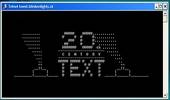
Convert any Video to ASCII using VLC Media Player

VLC is a video player with a lot of tricks. While you definitely would be aware about converting videos with it, the feature of converting any video to ASCII is one that is slightly less known. As ASCII version of movies like Star wars are very popular online, this feature of this amazing media player can be used to have lots of fun.
Useful Keyboard Shortcuts for Windows Computers

While most of us are already aware of obvious keyboard shortcuts like “Alt+F4” and “Ctrl+C”, there are some obscure shortcuts which most of us tend to overlook. These keyboard shortcuts are not only useful for the average PC user but for advanced users as well. This article contains many such amazing keyboard shortcuts which if used properly could save a lot of time and effort. So let's get started.
Convert, Resize and Cut Videos with VLC Media Player
VLC, the free and open source media player is great at playing media of even the most obscure formats. However, that is not all it can do. It can be used to easily convert videos from one format to other. Converting videos with VLC media player is pretty fast and is in the league of most premium video converters in terms of quality. It can also be used to resize videos from one size to other for when you need to shrink videos to fit in your mobile devices. It can also serve as a quick video cutting tool.
Folder Protector: How the program works

Some time ago, I released a folder locking application on this blog. It has been downloaded by a lot of users till now. Many of them are curious about how the program works and regularly send me emails inquiring about this. This article will explain exactly what the program does and how it locks folders.
Lock a Folder With Password Using Free Folder Protector
All of us have some files and folders that we consider private. They can be anything from our business documents to pictures of friends and family. These are files that we don't want other people using our computer to know about. Most of us get in awkward situations when these files are discovered by unwanted people.
Add Background Images to Folders in Windows

Suppose you have a music folder that contains all songs by your favorite singer. Would it not be great if instead of the plain white background, you could add the singer's image as the background of this folder?
It is relatively easy to add background images to folders using a simple desktop.ini trick just as easily as you can change your Desktop's background.
It is relatively easy to add background images to folders using a simple desktop.ini trick just as easily as you can change your Desktop's background.
Enable Command Prompt Disabled by Administrator or Virus

Command Prompt is the tool in Windows which allows users to interact with their computer from a character user interface(CUI). It allows users to bypass most restrictions that are enforced on the Windows Explorer based GUI. Hence, it can also be used to remove viruses and malware and also undo their effects. To avoid this, most viruses disable the Command Prompt. Some administrators also purposefully disable the Command Prompt to prevent users from changing critical settings of the computer.
13 Computer (PC) Tricks You Should Try Right Now

Computers have simplified our life to a great extent. Things that were impossible earlier can now be completed instantly thanks to computers. However, this does not mean that a PC is all work and no play.
Here are some of the best tricks you can try out on your Windows based computer.
Here are some of the best tricks you can try out on your Windows based computer.
 About
About
Akhilesh Sharma maintains and writes Tweak And Trick. He is a technology enthusiast and a science student.
You can contact him at tweakandtrick@gmail.com.
read more >>
You can contact him at tweakandtrick@gmail.com.
read more >>